
Aurora Workflow
Your workflow, beside you.
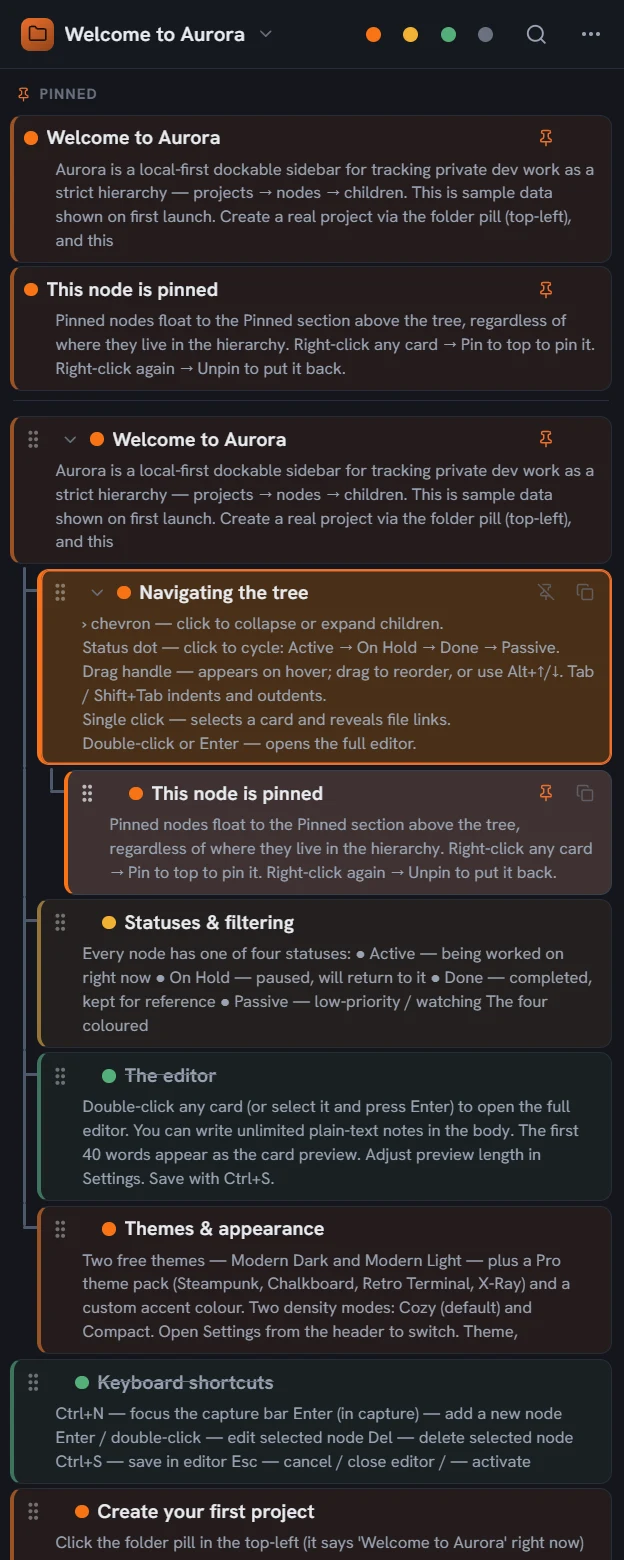
Aurora Workflow is a desktop workspace for people who manage more than one thing at a time: your projects, notes, tasks and the files that belong to them live in a panel that is always beside your work, so you stop switching between applications to answer "what was I doing?" By default your data stays on your own machine, which matters when the work is confidential. Public 1.0.0 is upcoming; the waitlist is open on auroraworkflow.com.
Who it is for
You do not have to work in scattered pieces. Aurora Workflow brings your projects, your notes, your tasks and their related files into one panel, in an order you can track.
-
Independent professionals running several clients or projects
Keep each client as its own project, and take notes and tasks down as many levels as the work needs. See at a glance which job is running, which is waiting, and which is finished.
-
People tracking many small things at once
Not everything needs its own application or browser tab. Run your work from one panel, from small tasks through to projects that stretch over months.
-
People who want a workspace that stays visible beside their work
Aurora Workflow sits docked on your desktop. A keyboard shortcut brings it forward when you need it, so you get back to a note, a task or a project without leaving what you were doing.
-
People who would rather not leave the keyboard
Move through the tree, open a note and change a status without reaching for the mouse. The global shortcut that summons the panel from anywhere is in Pro.
-
Professionals who care about privacy
Aurora Workflow is local-first. Your projects, notes and working data stay on your own computer by default. Pro adds encryption and a password lock for sensitive projects.
-
People whose files are scattered across folders and drives
Stop having to remember where a file lives. Link files and folders to the note they belong to, and open them from inside Aurora Workflow in one click, with no path to copy.
-
Companies that want one shared way of tracking work across their staff (coming)
A Pro licence does not tie one person to one computer. It covers more than a single device, and because Aurora Workflow is local-first, an internet connection does not have to stay open.
-
People who want to start without opening an account
The Free edition lets you start using Aurora Workflow without creating an account, without entering a licence, and without sending your data to a server. Move to Pro when your needs grow.
-
Students, researchers, and anyone on long-running work
When a subject needs more than a handful of notes, the hierarchy earns its place. Organise topics, sub-topics, sources and to-dos in one tree, and find what you are after across the whole workspace.
What it does
-
Dockable sidebar
Dock it left or right. With auto-hide and a launcher, it is right there the moment you need it.
-
Projects, notes, tasks
Organise a project as a tree of notes. Every note carries a status, search reaches all of them, and one keyboard shortcut brings the panel to you.
-
Unlimited hierarchy
Notes nest as deep as the work requires. There is no artificial depth limit on parents, children, or anything below them.
-
Status labels
Every note takes one of four plain states: Active, Hold, Done, and Passive. That keeps the tree honest without an endless colour system.
-
File links
Pin files and folders to any note. One click opens them in your default application, so there are no paths to copy and paste.
-
Your data stays on your machine
In the Free edition your projects and notes are held only on your own computer. When device sync arrives, keeping everything local remains a choice rather than a limitation. Project encryption and password locks are in Pro.
Good to know
- The Free edition does not ask you to create an account, and it holds up to 5 projects.
- Pro is a monthly or annual subscription. It includes unlimited projects and notes, project encryption and password locks, reminders, premium themes, a custom accent colour, a quick-capture shortcut, Markdown export, and configurable auto-backup.
- Templates and hosted end-to-end-encrypted sync are planned for Pro and are not part of it yet.
- Pro Lifetime is a one-time payment for every local Pro feature, for life, and it includes the updates that follow. The future hosted sync is not included.
- One Pro licence lets you run Aurora Workflow on 3 computers.
- Aurora Workflow works without an internet connection. Your licence only needs to reach the internet about once every 30 days to re-check itself.
- Windows today. A macOS version is coming.
- Interface languages: Turkish and English.