LUTForge
Generate 3D LUTs from image pairs
LUTForge turns a before/after image pair into a 3D LUT: it learns the grade from your example and exports a standard .cube file, with JSON sidecar metadata, in the Adobe/IRIDAS format used by post-production and colour-grading programs. It stands on its own, and it is the companion to ChromaBlender; both make their home at chromablender.com.
Who it is for
LUTForge is for people who have already found a look and now need it to travel: to the rest of a shoot, to a different program, or to someone else on the job.
-
Colourists and post-production professionals
Hand the finished look over as a standard Adobe/IRIDAS .cube file. When the tonal transitions have to hold, Pro brings 33³ and 65³ grids and tetrahedral interpolation.
-
People who shoot both stills and video
Build the look on a single before and after frame pair, then carry it into the program where the footage gets finished.
-
Photographers with a look of their own
Hold the same tone across an entire shoot from one LUT, instead of rebuilding the same settings frame by frame.
-
Retouchers matching a set to one approved edit
Given a single sample the client has signed off on, LUTForge derives the transformation straight from that pair, so the rest of the set can follow it.
-
Small studios that need a look to become a file
A grade turns into something you can archive, hand over and reuse, and the JSON sidecar keeps a record of what the LUT actually does.
-
People who build LUT packs for others
Whichever grid size you pick, the export is a clean .cube in the format post-production and colour-grading programs read.
What it does
-
LUTs from image pairs
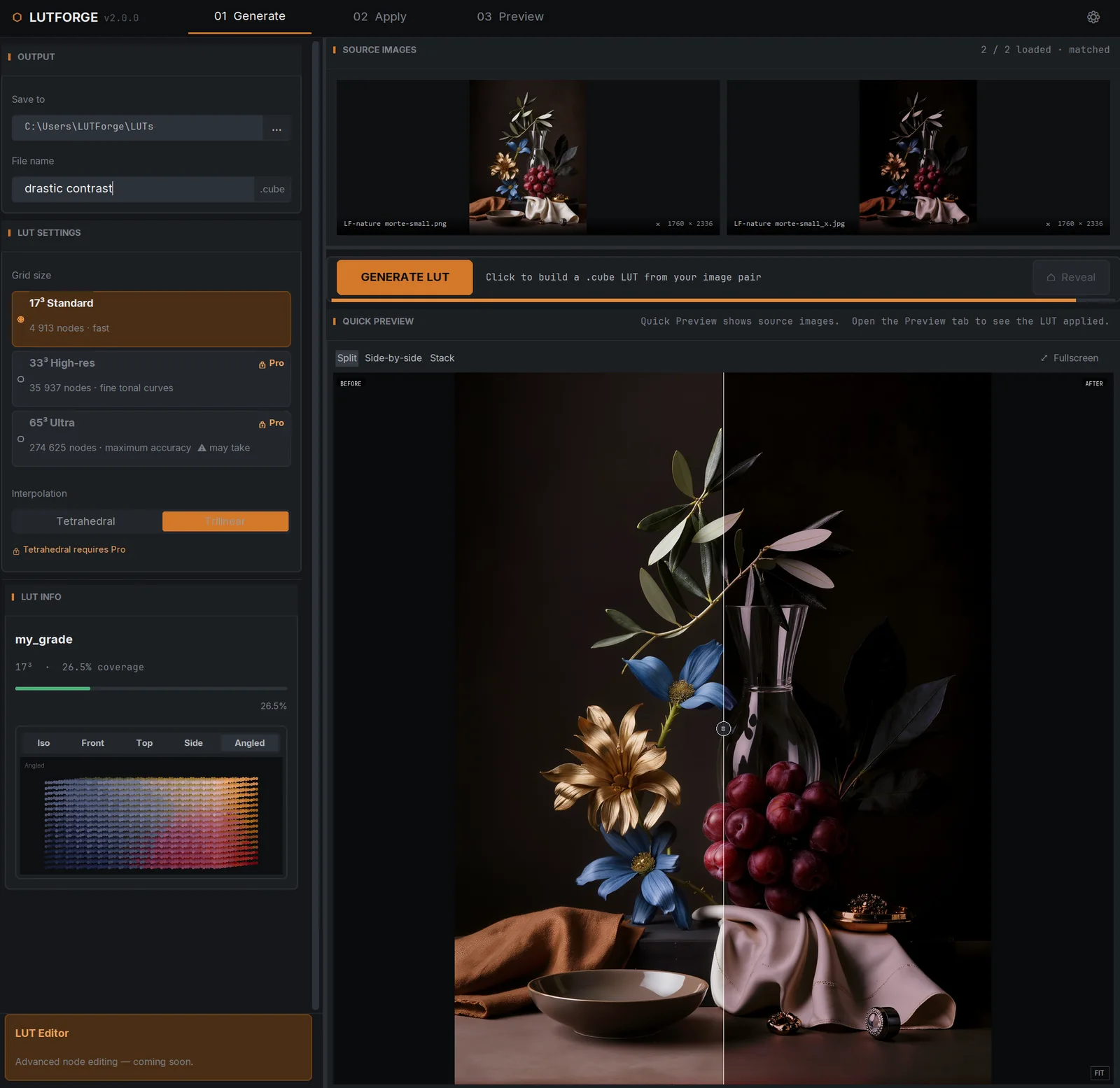
Feed it a before/after pair; LUTForge derives the transformation as a 3D LUT you can reuse anywhere.
-
17³, 33³ or 65³ grids
Basic ships the standard 17³ grid (4,913 nodes). Pro unlocks 33³ high-res and 65³ ultra grids for the finest tonal curves, and all of them export clean .cube files.
-
Tetrahedral interpolation
Pro uses Sakamoto tetrahedral interpolation for cinema-grade accuracy. Basic uses trilinear.
-
Industry-standard export
Writes the Adobe/IRIDAS .cube format used by post-production and colour-grading programs.
-
JSON sidecars
Export the colour logic alongside the LUT as JSON metadata, for easier pipeline integration and record-keeping.
-
Preview before you commit
Compare the original and the graded image in real time before you export, and apply preset LUTs to your images inside the app.
Good to know
- One-time payment, lifetime licence. There is no subscription.
- Basic and Pro each cover one PC. Pro adds the 33³ and 65³ grids, tetrahedral interpolation, and priority support.
- A 14-day trial covering the full Pro feature set is started from inside the app, and asks for no credit card.
- Licences are machine-bound and work offline; they need to reach the internet about once every 30 days to stay verified.
- Runs on Windows.